 Kimai Docs
Can I change my Kimai Cloud domain?
Short answer: No.
Long answer: No — and there are no exceptions, but there are workarounds.
When you register for Kimai Cloud, you choose a subdomain (for example example.kimai.cloud).
This subdomain is permanently bound to your Kimai instance and cannot be changed later.
This is not a policy decision or a missing feature — it is a technical limitation of how Kimai Cloud is provisioned and operated. Once an instance is created, the subdomain becomes an integral part of its infrastructure and identity. Renaming it is not technically possible without recreating the entire instance.
For this reason, we clearly state during registration that the selected subdomain cannot be changed afterward:
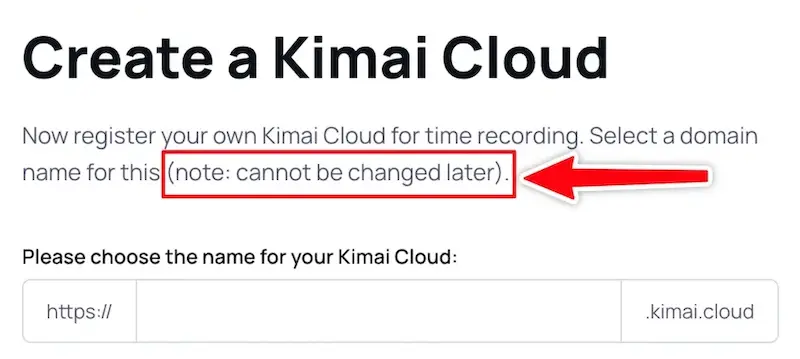
Please choose your subdomain carefully. Even small details like using test, demo, or other temporary names cannot be corrected later.
“But I accidentally used
testin the name…”
We understand that this can be frustrating. Unfortunately, even in this case, the subdomain cannot be renamed.
There is no manual intervention, support override, or paid exception that would allow changing an existing Kimai Cloud subdomain.
Alternative solutions
While the original subdomain cannot be changed, you have the following options:
Option 1: Custom domain (recommended)
If you’re on the annual Pro subscription, you can configure a custom domain.
Instead of using example.kimai.cloud, you can access your Kimai instance via time.example.com or kimai.example.com.
This is the best solution if you want a professional or branded URL without recreating your instance.
→ See: Custom domain documentation
Option 2: Create a new instance and migrate your data
If a custom domain is not an option, you can recreate your Kimai Cloud instance with a new subdomain and migrate your data manually.
Steps:
- Export your timesheets from the existing instance as CSV (Timesheets → Export)
- Create a new Kimai Cloud instance with the correct subdomain
- Import the data into the new instance (System → Importer)
Please note:
- This is a manual workaround
- All settings and configuration must be recreated
- The original instance and its subdomain remain unchanged
Summary
- A Kimai Cloud subdomain cannot be changed
- This is due to technical constraints, not policy
- Use a custom domain or recreate the instance if the current subdomain is unsuitable