 Kimai
Kimai
Absence calendar is available — get ready for Easter

Valentina
@ivalentinaIf you manage a team of more than five, you probably already feel Easter is coming. The out-of-office replies, the absence request emails, Slack messages about days off…
For business owners and team managers, the holiday season doesn’t just mean a few quiet days off. It also means an absence notification avalanche, and it hits long before the long weekend actually starts.
Does your team’s absence management still live in your inbox? For most managers, the answer is “yes” and it costs more time than anyone tracks.
The good news: this is a solved problem. The right digital tool like Kimai’s Absence Management helps you manage the team’s absences easier.
How Digital Tools Solve the Absence Management Problem
If you’re a business owner or team manager searching for a better way to handle absence approvals, leave requests, or sick leave tracking, your frustration is well-founded. Here’s what email-based absence management actually looks like in practice:
- Inbox overload
- No single source of truth
- Scheduling conflicts go unnoticed
- Sick leave tracking is inconsistent
- Approval bottlenecks slow everything down
- No data for planning or reporting
If you’ve been searching for an absence management tool, a team leave tracker, or a way to automate absence approvals, you’ll find a broad landscape of options: HR platforms, ERP absence modules, Project Management Tools, Spreadsheet Templates, and Time Tracking solutions like Kimai.
Kimai’s approach is all about time in the heart of your business. The teams track actual work and their planned absences live in the same platform. As a result, no duplicate data entry and no switches between the tools.
Kimai Absence Management: A Complete Overview
Kimai is an open-source time tracking platform used by thousands of businesses worldwide. Absence management is available in Kimai Cloud and as a plugin for self-hosted / on-premise solutions.
Here’s what the Absence Management feature covers:
- Absence types: Configure any type your business uses: annual leave, sick leave, public holidays, parental leave, unpaid leave, special leave, and fully custom types
- Approval workflow: Employees submit requests directly in Kimai; managers approve or reject with one click, no email required
- Entitlement tracking: Set annual leave allowances per user; Kimai tracks remaining balances automatically as requests are approved
- Sick leave logging: Log sick days quickly and consistently, with full reporting visibility for compliance and planning
- Public holiday management: Define holiday calendars per region or country; holidays are automatically factored into leave calculations
- Reporting and export: Generate absence reports by user, team, time period, or absence type, ready for payroll, HR audits, or planning
- Absence Calendar: The newest addition: a visual, team-wide calendar showing all absences at a glance (see below)
The New Feature: Kimai’s Absence Calendar
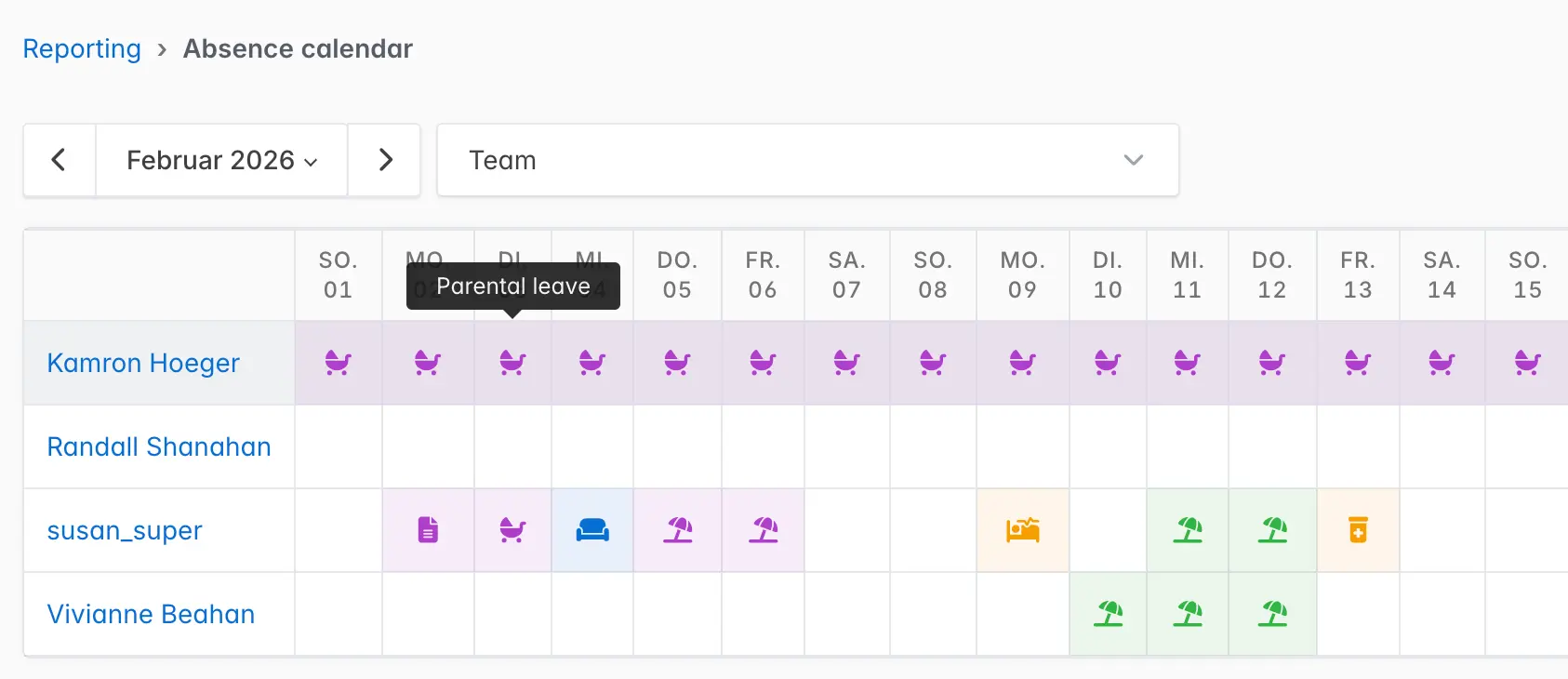
The Absence Calendar answers the most common question in team management: “Who is actually in next week?”
Instead of digging through approval emails, checking a shared spreadsheet, or sending a Slack message, you open Kimai and see the full picture instantly.
Every approved and pending absence for your team is displayed in a clean weekly or monthly view. You can filter by team or user group, or view the full organisation. At a glance, you know exactly who’s available for a meeting, who you can assign a task to, and where a coverage gap is coming up.
What the Absence Calendar includes:
- All absence types visible in one place
- Filter by team or user group
- Works for teams of all sizes
Take a look at this example.
Frequently Asked Questions About Team Absence Management
Kimai Professional handles both in a single, unified system — linked directly to your time tracking data. You can configure separate absence types, track individual entitlements, and report on both vacation and sick leave without switching tools or maintaining separate spreadsheets.
Kimai’s Absence Calendar gives you an instant visual overview. Open the calendar, select the relevant week, and you immediately see who’s on holiday, who called in sick, and who’s available — across your entire team or filtered by department.
Yes. Kimai Professional allows you to define public holiday calendars per region. These are automatically applied to employee leave balances, so that a local bank holiday doesn’t incorrectly count as a vacation day for that team member.
For teams that already use Kimai for time tracking, the Professional tier’s absence management is a natural and cost-effective extension. It covers the core needs of most SMBs — without the price tag or complexity of full HR platforms. For absence tracking, leave approval workflows, and team calendar visibility, Kimai Professional covers the full workflow end to end.
Absolutely. Kimai is a web-based platform accessible from anywhere. Remote and hybrid teams use it to submit absence requests, view team availability, and manage leave entitlements — without relying on office-based workflows or physical HR processes.
Absence Management and Absence Calendar in particular are available in the Professional plan of Kimai Cloud.
Ready to start with pain-free absence management?
Try all the features of Kimai Absence Management including Absence Calendar in our Demo or during your free 30-days trial.