 Kimai
Kimai
发票付款提醒
通过电子邮件发送逾期发票的付款提醒

Simon Schaufelberger
Automated payment reminders by email
A Kimai plugin that automatically sends payment reminders for overdue invoices — to the customer with the invoice attached and internally to the responsible team members.
No more manual follow-ups: the plugin checks daily for open invoices and sends tiered reminders based on how long the payment is overdue.
What’s included?
- Daily check for overdue invoices with status “Pending”
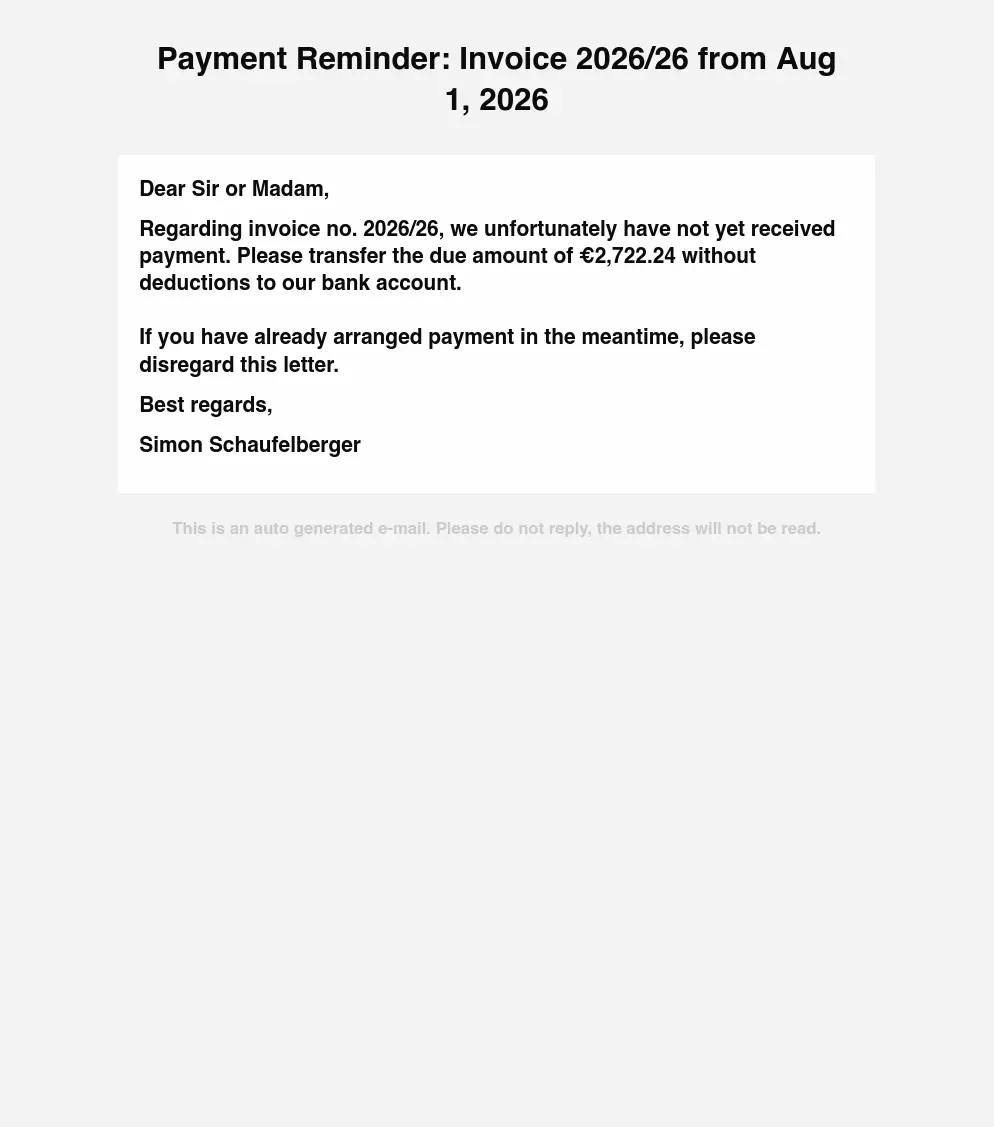
- Email reminders to the customer (optionally with the invoice attached)
- Internal notifications to invoice creators and/or selected users
- 3 reminder levels:
- Level 1: 1 day after due date
- Level 2: 8 days after due date
- Level 3: 15 days after due date
- Configurable reminder intervals
- Custom meta fields on invoices to track reminder status
- Fully customizable email templates
System Requirements
You need the ability to execute cronjobs on your server, either in your hosting administration platform or manually via crontab -e.
This is required for running the command bin/console invoice-payment-reminder:send on a daily basis.
Setup steps after Installation
1. Configure the plugin
Go to System > Settings > Invoice Payment Reminder to configure the plugin:
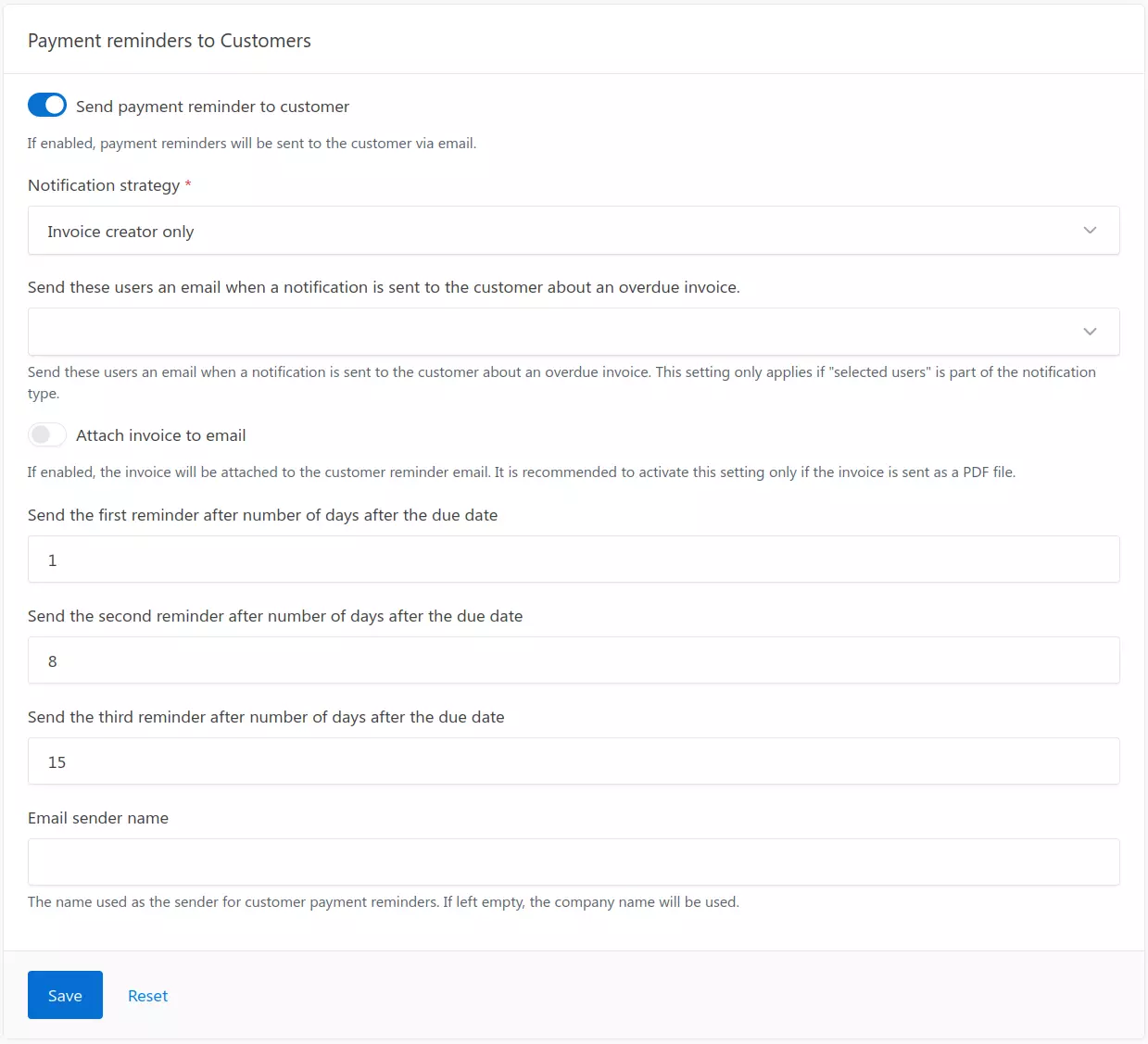
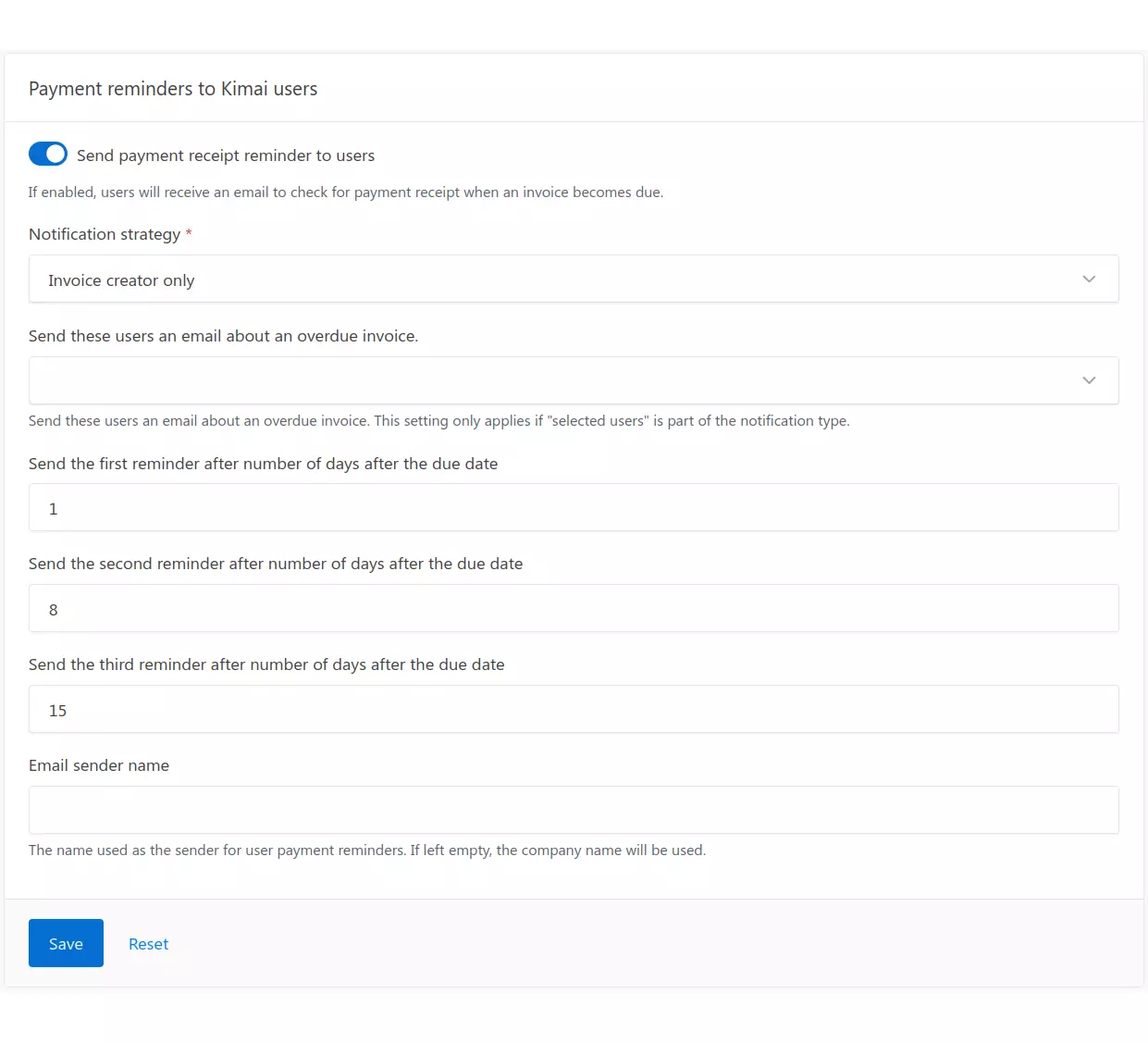
There are two sections for configuring the plugin: “Payment Reminders for Kimai Users” and “Payment Reminders for Customers”
- Notification Strategy: Choose who receives internal notifications:
- Invoice creator only: Only the user who created the invoice.
- Selected users only: Only specific users selected in the configuration.
- Invoice creator and selected users: Both groups receive notifications.
- Notify Users: Select the users who should receive notifications (multiselect).
- Attach Invoice: Enable or disable attaching the invoice PDF to the customer reminder email.
- Check Bank Account: When enabled, sends an email to internal users when an invoice becomes due, reminding them to check for payment receipt.
- Reminder Intervals: Configure the number of days after the due date for each reminder level.
2. Set up the cron job
To send reminders automatically every day, add a cron job to your server.
Add the following line to your crontab (runs daily at 8:00 AM):
0 8 * * * cd /path/to/kimai && bin/console invoice-payment-reminder:send --env=prod >> var/log/invoice-reminder.log 2>&1
3. Run the command manually
You can also run the command manually at any time:
bin/console invoice-payment-reminder:send
Use the --dry-run option to test the process without sending any emails or writing to the database:
bin/console invoice-payment-reminder:send --dry-run
Customizing email templates
The default email templates are located in Resources/views/emails/:
customer_reminder.html.twig— Sent to the customer.user_check_payment_received.html.twig— Sent to internal users when an invoice is due to prompt them to check for payment receipt.user_notification.html.twig— Sent to internal users when a customer reminder has been dispatched.
Important: Do not modify the original plugin templates directly, as any plugin update will overwrite your changes. Instead, customize the templates by creating your own Kimai plugin using an
EventSubscriberthat listens toModifyTemplatedEmailEvent.
How to create a Kimai plugin is explained in the official Kimai Plugin Documentation.
Translation
The plugin is available in two languages: English and German. To offer the plugin in your language, please contact me, and I will translate the labels accordingly.
兼容性
下表包含插件与所需的最低 Kimai 版本之间的比较。
| Bundle 版本 | 最低 Kimai 版本 |
|---|---|
| 1.0.0 | 2.63.0 |
安装
复制文件
Extract the ZIP file and upload the included directory and all files to your Kimai installation to the new directory:
var/plugins/InvoicePaymentReminderBundle/The file structure needs to look like this afterwards:
var/plugins/
├── InvoicePaymentReminderBundle
│   ├── InvoicePaymentReminderBundle.php
|   └ ... more files and directories follow here ...
清除缓存
After uploading the files, Kimai needs to know about the new plugin. It will be found once the cache was re-built. Call these commands from the Kimai directory:
How to reload Kimai cache
bin/console kimai:reload --env=prod
It is not advised, but in case the above command fails you could try:
rm -r var/cache/prod/*
You might have to set file permissions afterwards:
Adjust file permission
You have to allow PHP (your webserver process) to write to var/ and it subdirectories.
Here is an example for Debian/Ubuntu, to be executed inside the Kimai directory:
chown -R :www-data .
chmod -R g+r .
chmod -R g+rw var/
You might not need these commands in a shared-hosting environment.
And you probably need to prefix them with sudo and/or the group might be called different from www-data.
更新
Updating the plugin works exactly like the installation:
- Delete the directory
var/plugins/InvoicePaymentReminderBundle/ -
Execute all installation steps again:
- 复制文件
- 清除缓存
截图
FAQ
These FAQs are provided by the developer of this offer.
All paid plugins are annual subscriptions.
You can buy the plugin via the Marketplace LemonSqueezy and pay with Credit Card or PayPal for immediate access. You can also get in touch and pay with wire transfer or SEPA, but you will have to wait a few days before getting access to the plugin.
Support-questions, bug-reports and feature-requests can be made via the contact form at www.simonschaufelberger.de.
If you purchase a plugin subscription, you’ll receive all updates, bugfixes, and support for one year. After the subscription ends, your plugin will continue to work without any restrictions – you can keep using the last version you downloaded. This model is known as a perpetual fallback license. However, access to future updates, new features, and compatibility fixes require an active subscription.
No, refunds are not available. Kimai plugins are delivered as digital downloads and cannot be returned once the source code has been accessed. Additionally, payment providers charge non-refundable transaction fees, even if a refund were issued. For these reasons, all sales are final. The same applies for subscriptions that were not canceled in time. Please contact me before purchase if you’re unsure whether a plugin fits your needs.